

Choosing a business phone system today is less about hardware and more about the cloud PBX features your team actually uses.
A cloud-hosted PBX centralizes calling, messaging, and analytics so hybrid and multi-site teams get the same experience on softphones, browsers (WebRTC), and mobile apps—without juggling separate tools.
This guide focuses on the hosted PBX features that make a day-to-day difference: intelligent call routing (IVR and skills), call queues and ACD for busy lines, voicemail-to-email and visual voicemail, call recording and QA analytics, plus practical items like security, reliability, and admin controls.
We keep it practical and concise: what each VoIP feature does, why it helps sales and support, and when to use it so you don’t overbuy or overcomplicate. You’ll also see where modern VoIP phone features—like WebRTC in the browser and mobile caller ID—save time for remote and on-site staff.
By the end, you’ll have a clear checklist to evaluate a cloud phone system for business and the confidence to choose the right mix of features for your team.
Intelligent Call Routing (IVR & Skills)
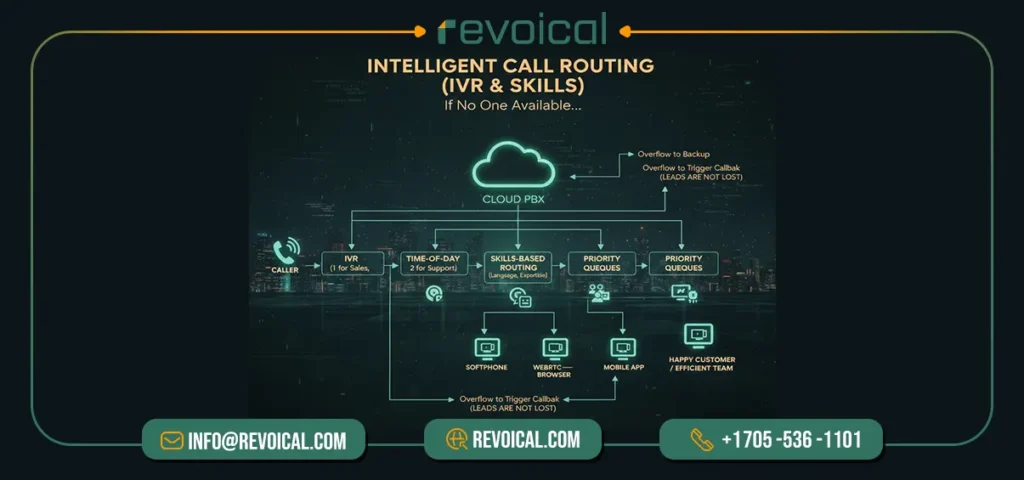
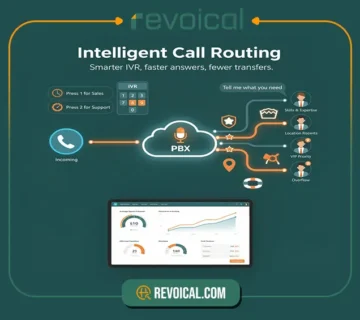
In a cloud-hosted PBX, intelligent call routing is the difference between “please hold” and “how can I help?”. Instead of parking every caller in the same queue, your cloud PBX features use a short IVR, time-of-day rules, and skills-based routing to send each call to the best available person—whether they answer from a softphone, a WebRTC browser tab, a mobile app, or a desk phone. It feels effortless for customers and efficient for your team.
How it works
You set business hours and holiday rules, group users by team and skill (sales, support, language), and define priorities. The IVR collects a simple choice (“1 for Sales”), then the hosted PBX features look for the right agent with the shortest wait. If no one is free, the system can overflow to a backup team, trigger a callback, or drop into voicemail-to-email—so leads aren’t lost. For multi-site or hybrid teams, route by geography, campaign, or language and keep a single public number across locations.
Why it matters
Smarter routing cuts wait times, lifts first-call resolution, and reduces transfers—core outcomes for any VoIP business phone system. Supervisors get clean, real-time analytics (answer speed, abandonment, handling time) to tune staffing without guesswork. Compared with a basic auto-attendant on legacy lines, this is a scalable, data-driven upgrade that grows with call volume and keeps service consistent.
Related Featurs of Hosted PBX: Time & Intelligent Routing
Call Queues & ACD for Busy Lines
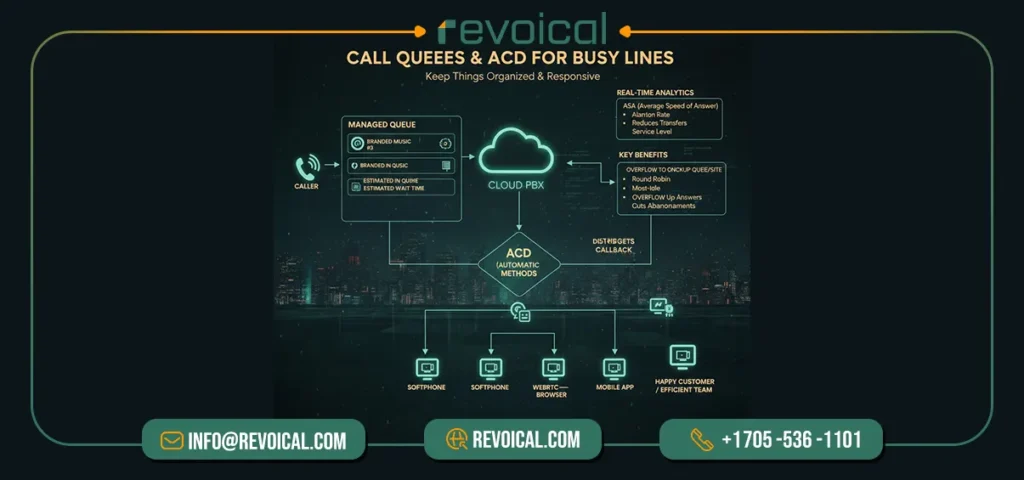
When call traffic spikes, a cloud-hosted PBX keeps things organized with call queues and automatic call distribution (ACD)—two must-have VoIP features for sales and support.
Instead of ringing every phone or dumping callers into voicemail, the system places each caller in a managed queue, plays branded music, and shares quick updates like “you’re caller #3” or an estimated wait time. As soon as an agent is free, ACD sends the call to the best person based on the rules you choose.
How it works in practice
Modern cloud PBX features let you pick fair, business-friendly distribution methods—round robin, least-recent, most-idle, or skills-based routing—so customers reach someone who can actually help. If the line gets long, offer callback (keep their place without staying on hold), or overflow to a backup queue, another site, or on-call mobile users.
Everything works across endpoints—softphones, WebRTC in the browser, mobile apps, and desk phones—so hybrid teams stay in rotation wherever they’re working.
Why it matters
Queues prevent the “all-lines-busy” experience, ACD reduces transfers, and together they speed up answers while cutting abandonments—exactly what a modern hosted PBX should deliver. Supervisors also get clear analytics—average speed of answer (ASA), abandon rate, handle time, and service level—so staffing and coaching decisions aren’t guesswork.
As you grow, you can spin up new queues for products, regions, or campaigns in minutes—no new hardware, no rewiring—keeping your VoIP business phone system responsive and scalable.
Read More: Call Center & Contact Center
Conversational IVR (TTS/STT)
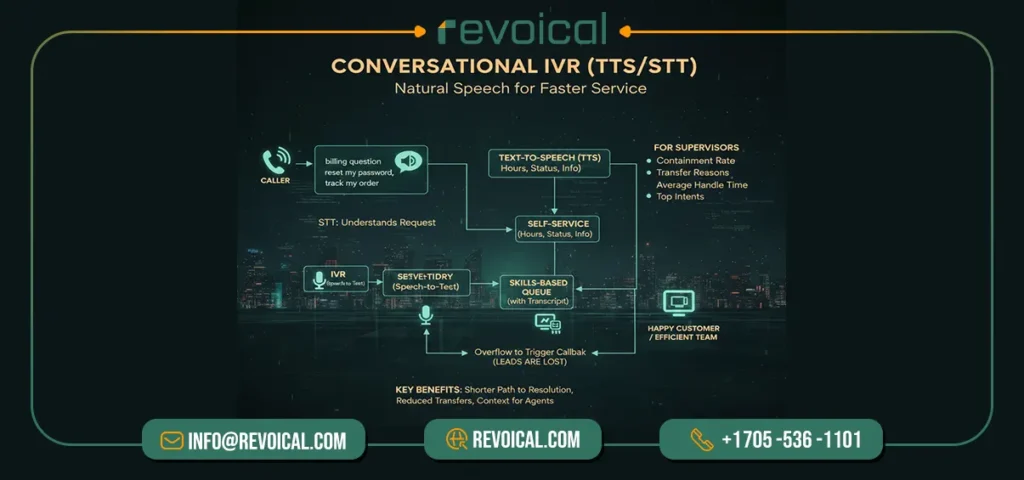
A conversational IVR replaces “press 1, press 2” with natural speech. Callers simply say what they need—“billing question,” “reset my password,” “track my order”—and your cloud-hosted PBX uses speech-to-text (STT) to understand the request and text-to-speech (TTS) to reply or route the call.
The result is a shorter path to the right answer, fewer transfers, and a smoother experience across phone, softphone, and WebRTC endpoints.
Here’s the plain flow
the IVR listens, confirms the intent in everyday language, and then either provides self-service (hours, order status, simple account info) or sends the caller to the correct skills-based queue with a short transcript.
Agents start with context, so they resolve issues faster. As your menus evolve, you can add new intents, support multiple languages, and publish updates without downtime—exactly the kind of cloud PBX feature that scales cleanly across sites and teams.
Why it matters for busy lines
conversational IVR is one of the most practical VoIP phone features for reducing wait times. It trims menu hops, keeps high-value agents focused on complex cases, and gives supervisors clear metrics to improve service over time—top intents, containment rate, transfer reasons, and average handle time.
See Related Featurs from Hosted PBX: Advanced Voice & AI Features
Softphone & WebRTC in the Browser
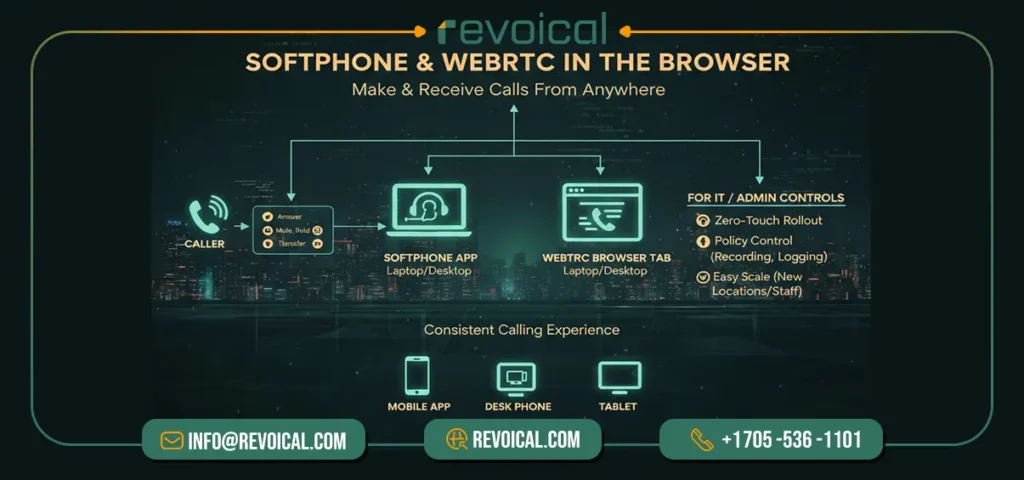
A modern cloud phone system for business should let people make and receive calls right from a laptop—without installers or special hardware.
With a softphone app or a WebRTC tab in the browser, users sign in, select a headset, and start calling with the company caller ID in minutes.
Core VoIP phone features—answer, mute, hold, transfer (warm/cold), recording, and presence—are available in a clean interface, so hybrid teams stay productive on any network (office Wi-Fi or home broadband).
For IT, this is one of the most valuable hosted PBX features: zero-touch rollout for new users, policy control from a central dashboard (recording rules, logging, retention), and easy scale when you open a new location or onboard seasonal staff. The result is faster setup, lower device costs, and a consistent calling experience across the organization.
Featurs Of Hosted PBX: Telephony Protocols, Media & Codecs
Voicemail-to-Email & Visual Voicemail
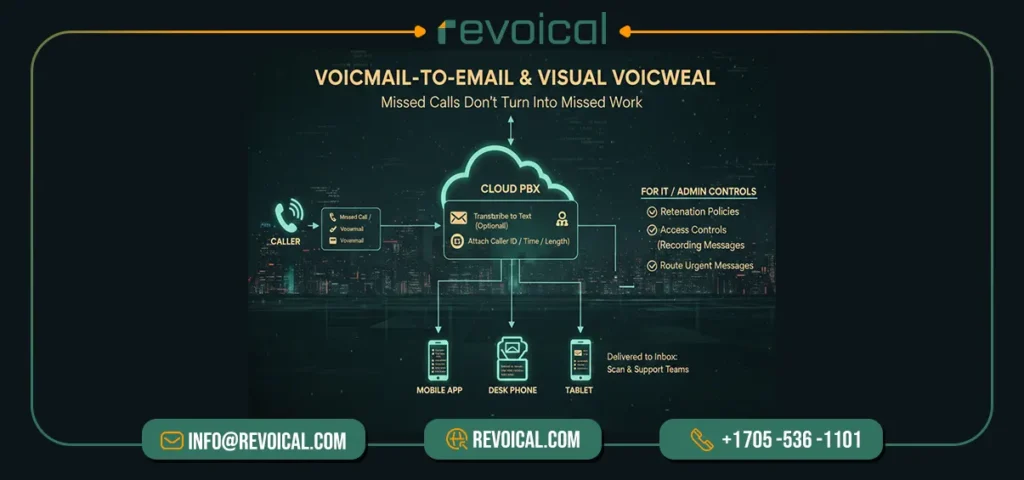
Missed calls shouldn’t turn into missed work. With a modern cloud PBX you get voicemail-to-email and visual voicemail—two practical VoIP phone features that keep follow-ups on track.
Each message is recorded, optionally transcribed to text, and delivered to your inbox and mobile app with caller ID, time, and length, so anyone on the team can scan, search, and respond in minutes.
Managers can enable shared mailboxes for sales or support, set retention policies and access controls from the admin panel, and route urgent messages to a queue or on-call user.
Because these are native hosted PBX features, they scale easily as you add locations or users—no extra hardware, no manual exports.
Related Featurs of Hosted PBX: Messaging, Fax & SMS
Call Recording, QA & Analytics
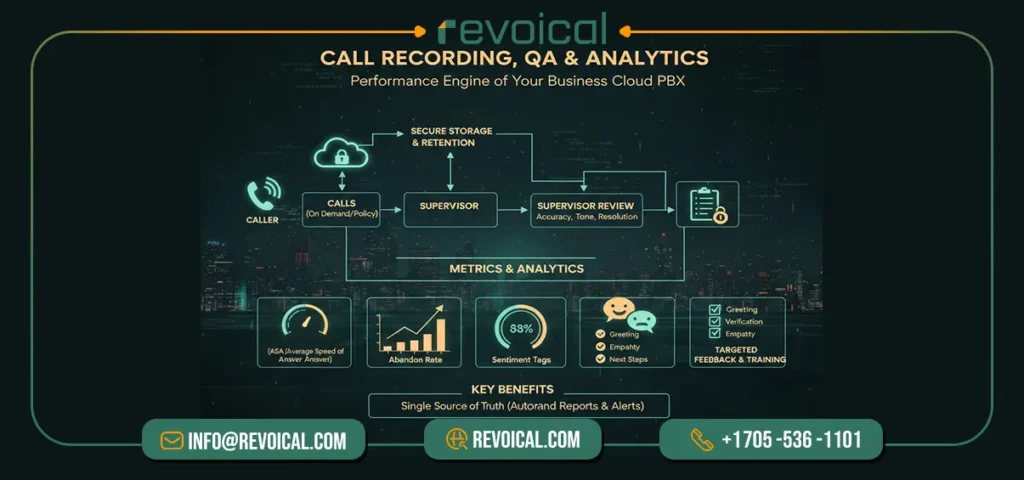
Call recording, quality assurance (QA), and analytics are core cloud PBX features that turn everyday conversations into measurable improvements. In a hosted PBX you can record calls on demand (for ad-hoc coaching) or by policy (for teams, queues, or campaigns). Secure storage, retention rules, and role-based access keep recordings compliant while supervisors review them for accuracy, tone, and resolution.
Beyond recordings, modern VoIP features surface the metrics that matter. Dashboards track ASA (Average Speed of Answer), abandon rate, handle time, first-call resolution, and sentiment tags—so you can spot bottlenecks and fix them fast.
Scorecards let managers evaluate calls against a clear rubric (greeting, verification, empathy, next steps), then share targeted feedback. For growing teams, these VoIP phone features make training consistent and prove service levels with real data.
Why it helps small and multi-site businesses: you get a single source of truth across locations and remote agents, automatic trend reports (by agent, queue, or campaign), and alerts when KPIs slip. Pair this with intelligent routing and you’ll lower wait times, reduce call transfers, and raise CSAT—without adding headcount.
In short, call recording + QA + analytics are the performance engine of a business cloud PBX.
See More: Call Center & Contact Center (features & components)
CRM & Helpdesk Integrations
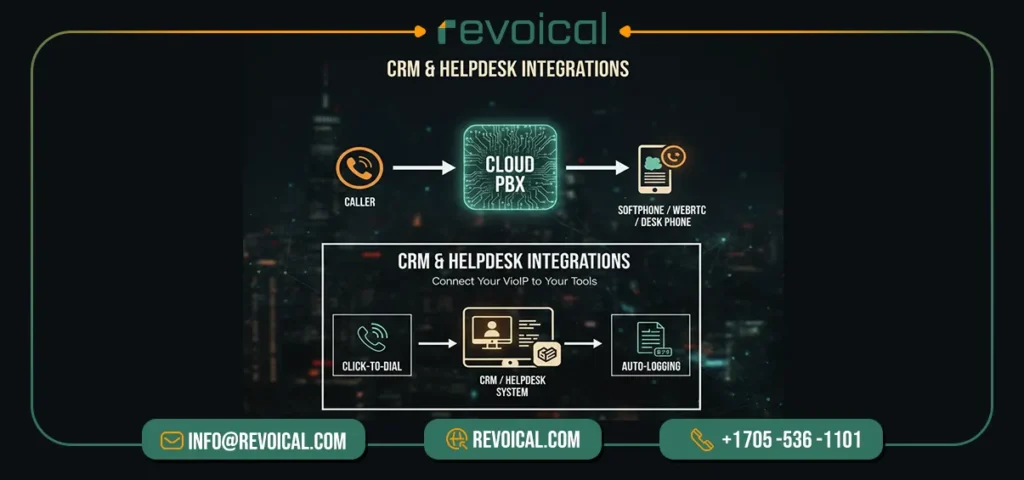
Your hosted VoIP phone system should meet your team where they work. With native CRM & helpdesk integrations, agents get click-to-dial, instant screen pops with customer records, and auto-logging of calls, notes, and outcomes.
That means less manual typing, cleaner data, and faster follow-ups. Typical flows include creating a ticket on missed calls, attaching recordings to opportunities, and syncing dispositions back to the CRM—small automations that add up to shorter handle times and better reporting.
For hybrid teams using softphones, WebRTC, or desk phones, these VoIP features keep every conversation tied to an account or case so nothing slips.
Read More About This Featur of Revoical Hosted PBX: Integration & Ecosystem
Contact Center Add-ons (Dialer, Whisper/Barge)
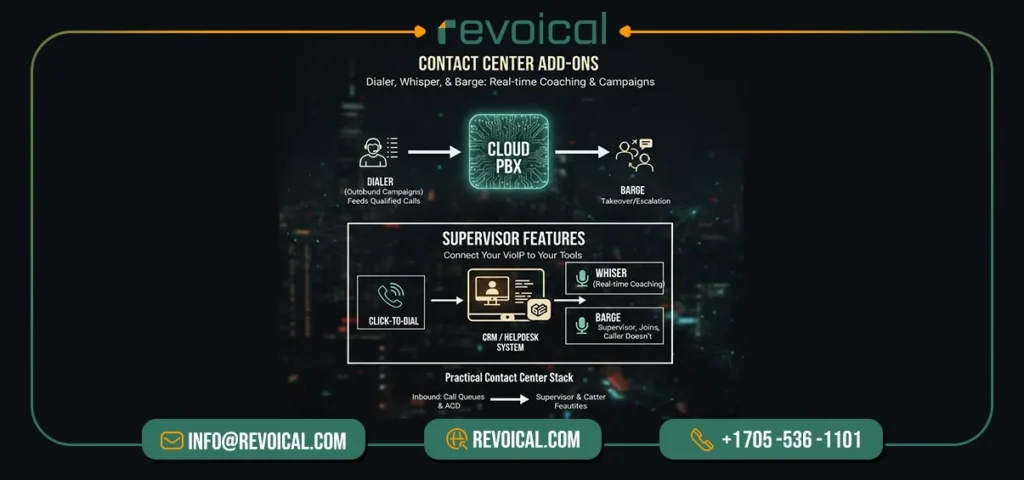
When you need lightweight VoIP call center capability without another platform, add a built-in preview/power dialer for outbound campaigns, plus whisper for real-time coaching and barge for supervisory takeover.
- The dialer feeds agents qualified calls from targeted lists.
- whisper lets supervisors guide the agent without the caller hearing.
- barge joins the call if escalation is needed.
Pair these hosted PBX features with call queues & ACD for inbound and you get a practical contact-center stack—campaigns launch faster, coaching happens in the moment, and QA gets the recordings and analytics it needs.
Messaging Built-In
With business messaging inside your cloud PBX, you can send and receive SMS/MMS from the same console you use for calls, assign conversations to teams, and keep archives for compliance.
Use templates for confirmations, reminders, and delivery updates; route messages by number, queue, or skill—just like calls. Result: one virtual PBX system for calls and messaging, unified analytics, and no context switching.
Telephony Protocols, Media & Codecs (For Compatibility)
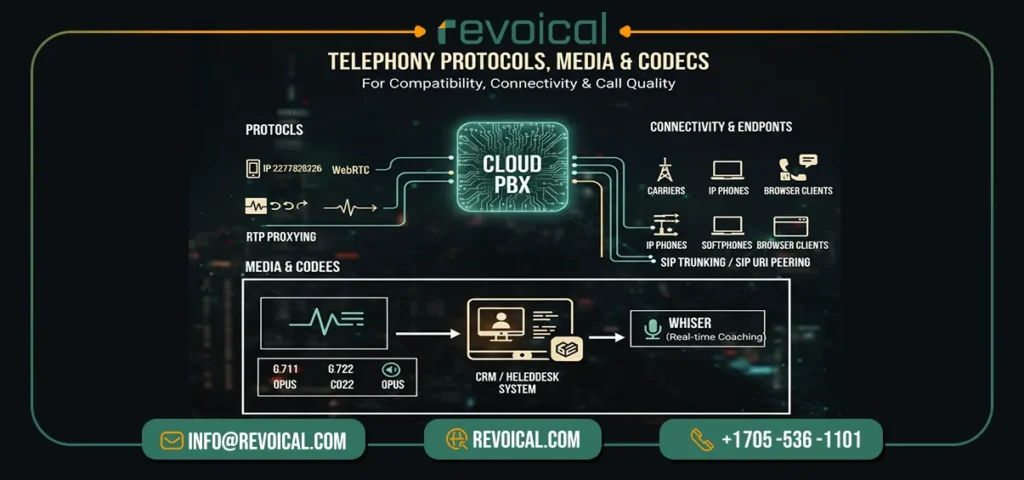
Under the hood, breadth matters. Support for SIP, WebRTC, and RTP proxying, alongside modern codecs (e.g., G.711, G.722, Opus), ensures your cloud-hosted PBX connects cleanly to carriers, IP phones, softphones, and browser clients.
This is the foundation that lets you mix endpoints, enable SIP trunking/SIP URI peering, and maintain call quality across offices and remote users.
In practice, these cloud PBX features reduce vendor lock-in and make migrations simpler—provision devices faster, test new trunks safely, and expand globally without rewiring.
Security, Compliance & High Availability
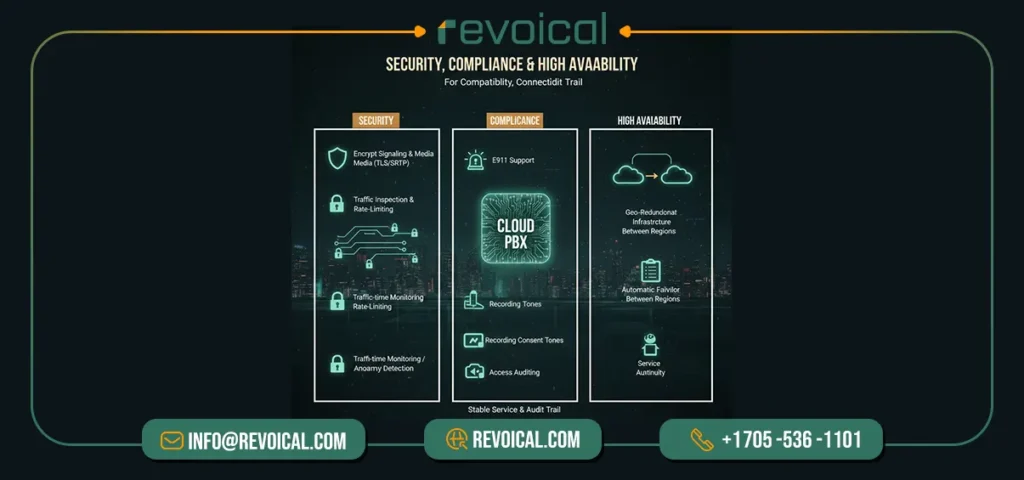
Voice is only useful when it’s secure and up. A modern hosted PBX should encrypt signaling and media (TLS/SRTP), rate-limit and inspect traffic at the edge, and provide real-time monitoring to spot anomalies quickly.
Compliance features—E911, recording consent tones, retention policies, and access auditing—keep operations aligned with policy. For resilience, design on geo-redundant infrastructure with automatic failover between regions so calls continue during ISP or site issues. Together, these hosted PBX features deliver stable service at scale and the audit trail businesses expect.
Related Featurs: Security, Fraud Prevention & Compliance
Cloud-Hosted PBX Features at a glance
A cloud-hosted PBX puts calling, messaging, and analytics in one place so teams can answer from browsers, softphones, or mobiles with the same experience. Use this quick snapshot to confirm what you need now—and what to add as you scale.
| Feature | What it does | Why it matters | When to use |
| Intelligent call routing (IVR & skills) | Sends callers to the right person using menus, schedules, and skills. | Shorter waits, fewer transfers, higher first-call resolution. | Sales/support across shifts, languages, or locations. |
| Call queues & ACD | Holds callers in line and assigns them fairly to available agents. | Orderly peaks, clearer SLAs, fewer missed calls. | Busy lines, campaigns, seasonal spikes. |
| Conversational IVR (TTS/STT) | Understands spoken intent (“pay invoice”), answers or routes fast. | Fewer menu hops, faster resolutions, agents get context. | Repetitive requests like billing, hours, order status. |
| Softphone & WebRTC | Place/receive calls in a browser or app—no installs, no desk tie. | Fast rollout, ideal for hybrid and remote work. | New hires, hot-desking, WFH teams. |
| Mobile apps with business caller ID | Answer on iOS/Android using the company number. | Professional identity on the go; work/personal separation. | Field teams, managers on the move. |
| Voicemail-to-email & visual VM | Sends recordings/transcripts to your inbox/app. | Quicker follow-ups; nothing slips. | Any team juggling many conversations. |
| Call recording, QA & analytics | Record by policy, score calls, track KPIs (ASA, abandon, AHT). | Coaching, compliance, data-driven staffing. | Sales coaching, support QA, regulated teams. |
| CRM/helpdesk integrations | Click-to-dial, screen pops, auto-logging. | Less manual entry; cleaner histories; faster wrap-up. | Teams living in CRM/ticketing. |
| Contact-center add-ons | Preview/power dialers, whisper coaching, supervisor barge. | Better connect rates and training without extra platforms. | Outbound campaigns, onboarding. |
| Messaging built-in (SMS/MMS) | Business texting with routing, templates, and archives. | Meet customers where they are; one shared inbox. | Reminders, confirmations, quick updates. |
| Protocols, media & codecs | Broad SIP/WebRTC support; modern codecs; RTP proxying. | Works with carriers/devices without lock-in. | Mixed devices, global trunks, phased migrations. |
| Security, compliance & HA | TLS/SRTP, rate-limits, monitoring, E911, geo-redundancy. | Secure, compliant, and resilient as you scale. | Always-on operations, regulated sectors. |
pick the features that match real workflows—smart routing and queues for busy lines, WebRTC and mobile for hybrid work, recordings and analytics for coaching, and integrations for clean data.
Want a quick next step? Talk to Revoical for a short assessment and a pragmatic rollout plan. so you enable the right cloud PBX features today and add more as your team grows.
FAQ
Not if it’s designed around intent: a short IVR (or conversational IVR) captures what the caller needs and routes to the right team/skill, which reduces transfers and repeat explanations.
A queue is meant to control busy moments, not hide them—features like position updates, overflow rules, and callbacks keep callers moving instead of hearing endless ringing, and metrics like average wait time show you when staffing needs tuning.
For many teams, browser calling works well because WebRTC enables real-time voice directly in modern browsers—useful for hybrid teams and quick setups without installs.
Because people ignore alerts; voicemail-to-email and visual voicemail reduce drop-offs by putting the recording (and often a transcript) right where teams already work—email and mobile.
Because messaging rules vary by number type and route—business texting often requires A2P compliance/registration (like 10DLC in the US), and some OTP/verification flows are stricter with VoIP routes than carrier (non-VoIP) ranges.
No comment