
A virtual phone number is a normal telephone number that is not locked to a SIM card or a physical phone line. Calls and SMS are routed through the cloud (over the Internet or carrier networks) to the device you choose—your laptop softphone, a mobile app, or a desk phone.
This makes a business virtual phone number easy to set up and move, while your public number stays the same if devices change. In practice, most companies use a VoIP number for everyday calling, and a non-VoIP number only when certain services require it for verification.
Related post: What Is VoIP and How Does It Work?
How does virtual numbers work?
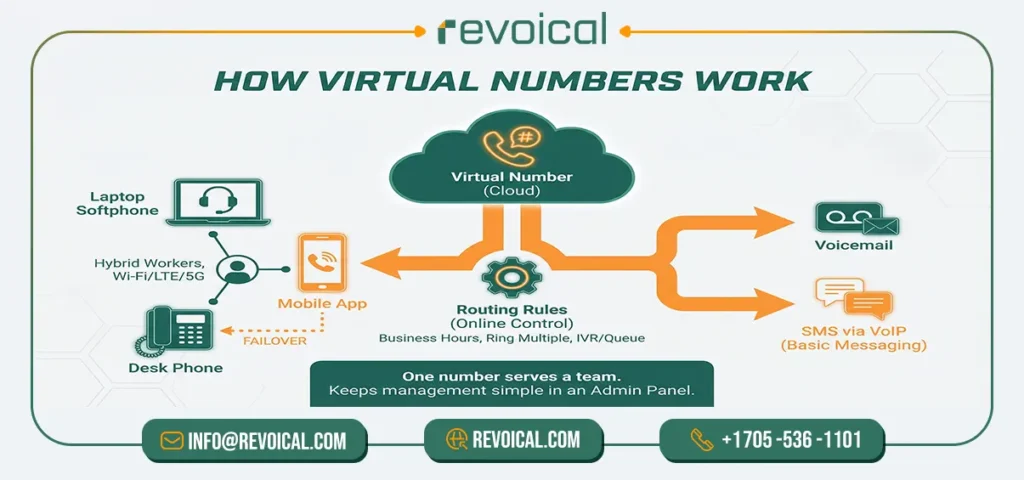
A virtual phone number sits in the cloud with simple routing rules you control. Incoming calls (and, where enabled, SMS) are forwarded to the device you choose—a laptop softphone, a mobile app, a desk phone, or straight to voicemail. You can set business hours, ring multiple users at once, or send calls to a queue/IVR so the right team answers. Because routing happens online, staff can pick up on Wi-Fi, LTE/5G, or office desk phones without changing the public number.
For virtual phone numbers for business, this means one number can serve a whole team, move with hybrid workers, and fail over to mobile if the office Internet is down. Most setups also support SMS via VoIP (or SMS to a VoIP number) for basic messaging, while keeping management simple in an admin panel.
See More: Revoical Hosted PBX
Types of virtual numbers
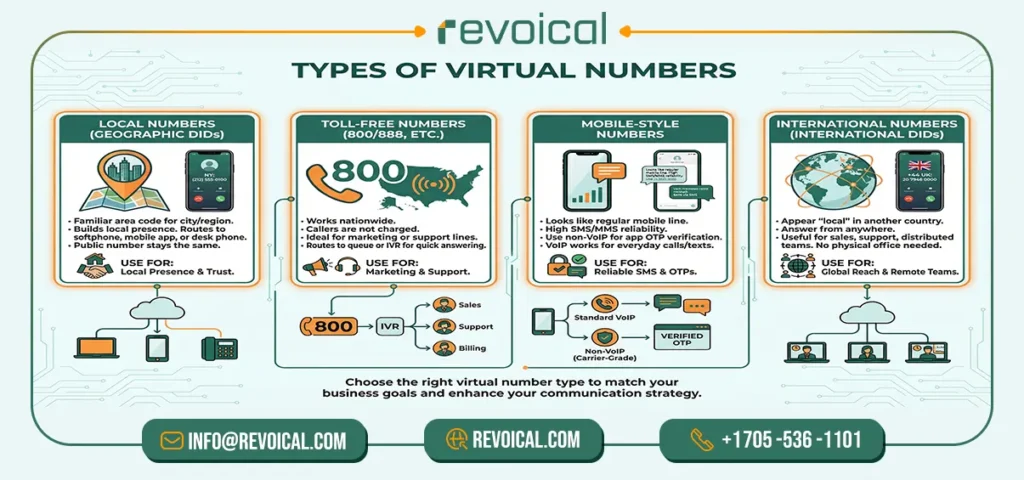
A virtual phone number can look different depending on your goal. Below is a clear guide to the four common types and when a business should use each one.
- Local numbers (geographic DIDs)
A local number shows a familiar area code for customers in a city or region. Calls and SMS route to your softphone, mobile app, or desk phone, but the public number never changes. This is the easiest way to build local presence with a business virtual phone number.
- Toll-free numbers (800/888, etc.).
A toll-free number works nationwide and is great for marketing or support lines. Callers are not charged, and you can send calls to a queue or IVR so the right team answers quickly.
- Mobile-style numbers.
These look like regular mobile lines and often deliver SMS/MMS more reliably. If an app requires a carrier-grade line for OTPs, use a non-VoIP number for verification. For everyday calling and messaging, a standard VoIP number usually works well.
- International numbers (international DIDs).
An international DID lets you appear “local” in another country while your team answers from anywhere. This is useful for sales, support, and distributed teams that need local trust without opening a physical office.
Many companies mix types—local numbers for each city, one toll-free for national reach, a mobile-style line where strong SMS delivery matters, and selected international DIDs for key markets. This keeps your routing simple while giving customers the most convenient way to reach you.
Related Featurs of Hosted PBX: Numbering & Porting
Business Virtual Phone Number: Real-World Use Cases
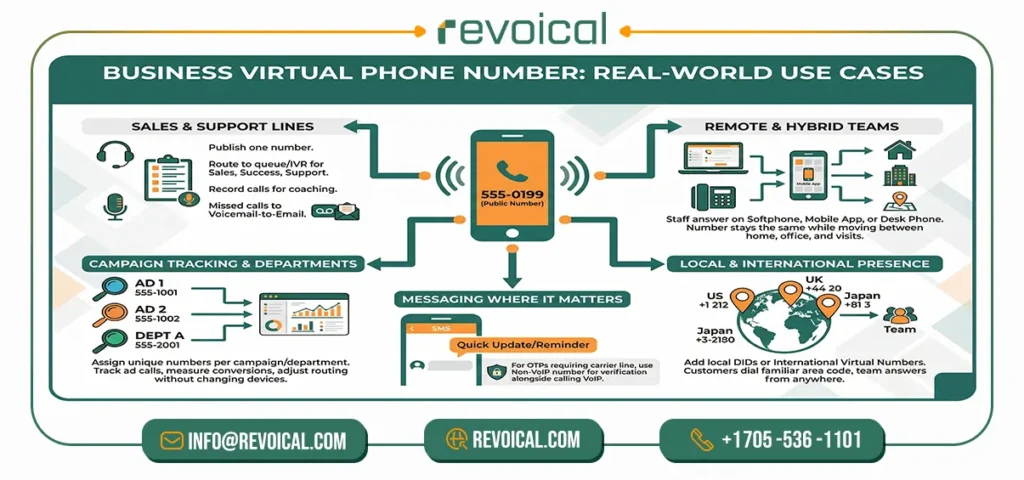
A business virtual phone number gives your team one public number that works anywhere and routes to the right people behind the scenes. Here are the most common, real-world uses—kept simple and focused so you can match them to your needs.
- Sales and support lines.
Publish one number for customers. Route calls to a queue or IVR so sales, success, or support answer in order. Record calls for coaching and send missed calls to voicemail-to-email.
- Remote and hybrid teams.
Staff answer on a softphone, mobile app, or desk phone. The virtual phone number for business stays the same while people move between home, office, and on-site visits.
- Campaign tracking and departments.
Assign a unique virtual number per campaign or department. You can see which ads drive calls, measure conversions, and adjust routing without changing devices.
- Local and international presence.
Add local DIDs for new cities or international virtual numbers for new markets. Customers dial a familiar area code while your team answers from anywhere.
- Messaging where it matters.
Many virtual numbers support SMS via VoIP for quick updates and reminders. If a service requires a carrier line for OTPs, use a non-VoIP number for verification alongside your main VoIP number for calling.
See: Revoical Soloutions
Virtual number vs VoIP number vs non-VoIP number
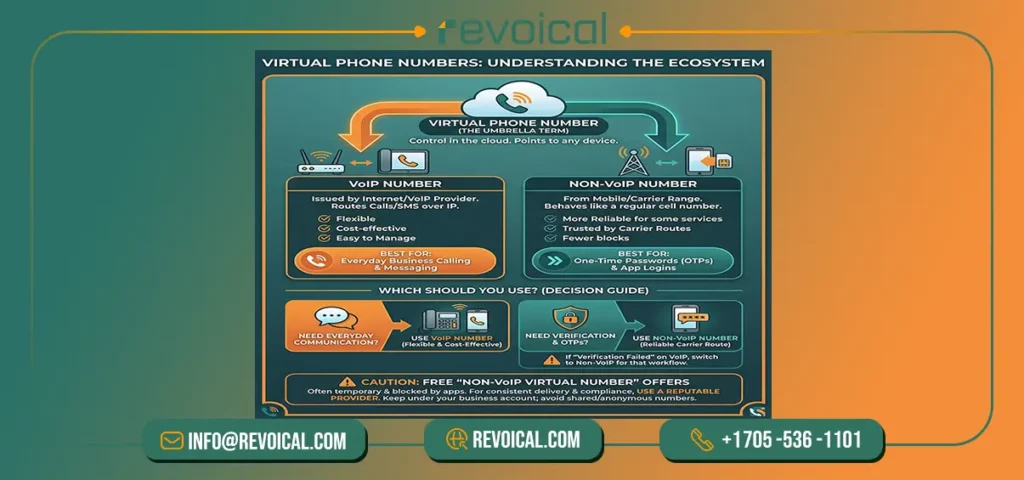
A virtual phone number is the umbrella term: it’s a number you control in the cloud and can point to any device. Within that, a VoIP number is issued by an Internet/VoIP provider and routes calls and SMS over IP to your softphone, mobile app, or desk phone. A non-VoIP number comes from a mobile/carrier range and behaves like a regular cell number.
Which should you use? For everyday business calling and messaging, a VoIP number is usually the best fit: it’s flexible, cost-effective, and easy to manage. For one-time passwords and app logins, some services only trust carrier routes, so a non-VoIP number for verification can be more reliable. If you see “verification failed” on a VoIP number, use a virtual phone number (non-VoIP) from a carrier range for that workflow.
A quick note on “free non-VoIP virtual number” offers: they’re often temporary and can be blocked by apps. For consistent delivery and compliance, use a reputable provider—keep your phone number (VoIP or non-VoIP) under your business account, and avoid shared/anonymous numbers.
Related Post: VoIP vs Landline vs Mobile
SMS with virtual numbers

Most virtual phone numbers can send and receive text, but support varies by provider and country. In general, SMS via VoIP works on many local and mobile-style numbers, while some ranges are voice-only. Before you launch a workflow, confirm whether your plan supports SMS to a VoIP number, inbound/outbound MMS, and delivery from short codes or A2P/10DLC routes (many services treat these differently from person-to-person SMS).
For one-time passwords (OTPs) and app logins, delivery can be stricter. Some apps prefer carrier routes, so if messages don’t arrive on your VoIP number, use a non-VoIP number for verification for that specific use case. If you only need quick tests, “free” or temporary numbers exist, but they’re often shared and can be blocked—avoid them for production
Best practice for a business virtual phone number:
- Check coverage (domestic/international) and whether MMS and A2P/10DLC are enabled for your number type.
- Run a small delivery test from your common apps before publishing the number.
- Keep opt-in/opt-out language and compliance in place so messages stay deliverable.
This way, everyday texting works smoothly on your VoIP number, and verification-critical flows can use a dedicated non-VoIP line where needed.
Virtual Phone Number Pricing: What You Actually Pay
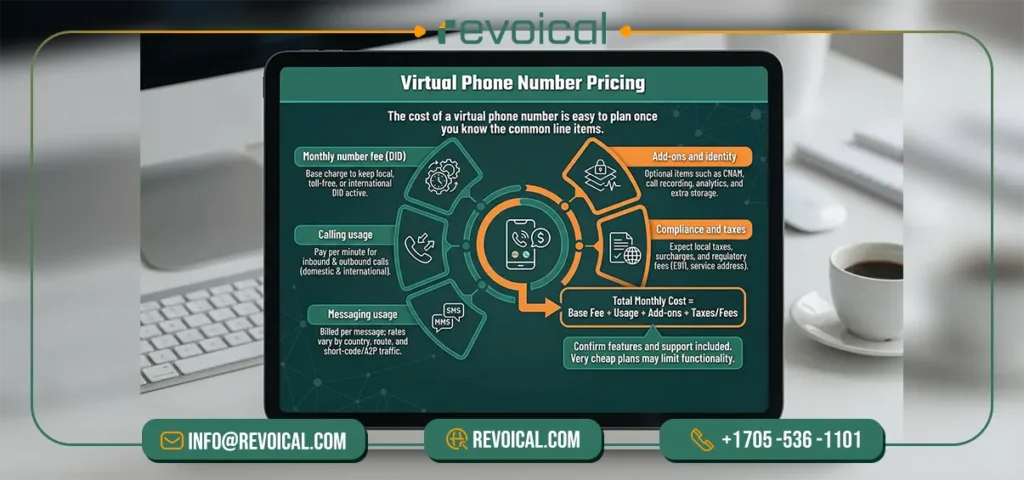
The cost of a virtual phone number is easy to plan once you know the common line items. Most businesses pay a small monthly fee to keep each number (DID) active, plus usage for voice and messaging. Very cheap plans can look attractive, but they often limit features or support—so confirm what is included before you publish your business virtual phone number.
Typical cost items for a business virtual phone number:
- Monthly number fee (DID): This is the base charge to keep a local, toll-free, mobile-style, or international DID active under your account.
- Calling usage: You pay per minute for inbound and outbound calls, with different rates for domestic and international destinations tied to your VoIP number.
- Messaging usage: SMS/MMS are billed per message; SMS via VoIP rates vary by country and route, and short-code/A2P traffic may have separate pricing.
- Add-ons and identity: Optional items such as CNAM (caller name), call recording, analytics, and extra storage add value but increase the total.
- Compliance and taxes: Expect local taxes, surcharges, and any E911 or regulatory fees associated with the number and service address.
See: Revoical Hosted PBX Pricing
Conclusion
A virtual phone number lets you publish one simple contact point and answer from anywhere—softphone, mobile app, or desk phone—while you control routing, hours, queues, and analytics in the cloud. Choose local, toll-free, mobile-style, or international DIDs to match how customers reach you, and add SMS/MMS where it helps.
If you want a quick check on coverage, messaging support, or pricing for your mix of numbers, talk to our team Revoical can review your use case and suggest a clean setup that scales with you.
FAQ
Yes. Most providers support number porting for local, toll-free, and many international DIDs. During porting, you can forward calls to your new system so there’s no downtime.
Often yes, but it depends on the number type and country. Many local and mobile-style DIDs support SMS via VoIP (and sometimes MMS). For short codes or strict OTP flows, some services prefer carrier routes; use a non-VoIP number for verification if delivery is critical.
A virtual number is the umbrella: a cloud-managed number you can point anywhere. A VoIP number routes over the Internet to your devices (softphone, app, desk phone). A non-VoIP number comes from a mobile/carrier range and is often accepted more reliably for one-time passwords.
You’ll typically pay a monthly fee per DID, plus usage (minutes and messages). Add-ons like CNAM, recording, advanced analytics, or international routes can increase the total. “Ultra-cheap” plans sometimes limit support or features—check what’s included.

No comment