

Choosing a business phone system doesn’t have to be complicated. Most companies end up comparing three clear options: VoIP (Internet-based calling), landline/PSTN (traditional fixed lines), and mobile/cellular.
This guide cuts through the noise: we explain what each option really is, how calls behave in day-to-day use, and the trade-offs that matter—cost, reliability, features, and emergency calling.
By the end, whether you run a small business that needs simple call handling or a growing, multi-site operation that wants modern features and remote work flexibility. you’ll have a practical view of VoIP vs landline vs mobile and know which setup fits your team.
Which phone system fits which team?

If you want software-level features, easy scale, and no new wiring, VoIP is the natural core. If your location sees frequent power or broadband outages, keep a few landlines as a dependable fallback.
If your staff spend most of the day on the move, mobile/cellular is the practical primary line. In practice, many businesses blend all three: VoIP at the center, mobiles for mobility, and a minimal set of landlines for resilience.
Read more: what is voip?
What’s the core difference?
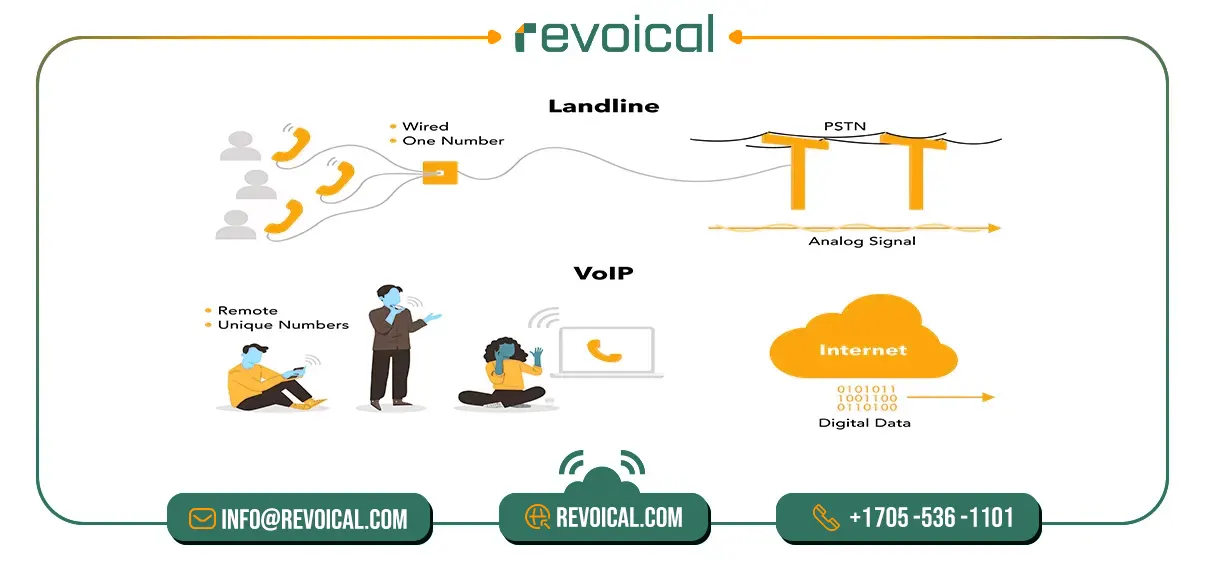
At a high level, the three options move a call in very different ways—this is why VoIP, landline (PSTN), and mobile/cellular feel and scale differently in a modern business phone system.
- VoIP (packet-switched and flexible): A VoIP call converts your voice into digital audio, breaks it into IP packets, and sends those packets over the Internet. Because it’s software-defined, you get flexible routing, browser/softphone calling, and easy integrations with tools like CRM and helpdesk. This is the foundation of a VoIP phone system or Hosted PBX.
- Landline/PSTN (circuit-switched and steady): A traditional line reserves a dedicated circuit for the entire call. That fixed path is stable and predictable, but it limits modern features and makes multi-site scaling slower and more expensive.
- Mobile/Cellular (coverage & movement first): Calls ride carrier radio networks (4G/5G). Mobility and reach are the strengths, but centralized control and desk-style features usually require pairing mobile with a VoIP extension.
So VoIP uses packets for flexibility and software control, landline uses circuits for stability with fewer features, and mobile prioritizes coverage and on-the-go communication. You can choose the combination that fits how (and where) your team actually works.
Call Quality: What Really Affects Your Calls

Great-sounding calls don’t just depend on “fast Internet.” For VoIP, landline, and mobile, three things matter most: delay, consistency, and a clean connection. If any of these slip, you’ll hear echoes, overlaps, or choppy audio.
Landlines (PSTN) use a fixed path, so they’re usually steady but lack modern features. VoIP runs over the Internet, so quality depends on how busy your network is. Mobile is built for movement; quality follows signal strength and how crowded the cell tower is.
Quick Checklist (Plain Numbers You Can Use)
Think of this as a simple rule-of-thumb to keep VoIP call quality natural:
- Bandwidth: about 100 kbps up + 100 kbps down per active call (a tiny slice of typical broadband).
- Delay (latency): try to keep it under ~150 ms so people don’t talk over each other.
- Consistency: avoid big spikes and drops. If the connection wobbles, calls can sound choppy.
For most businesses, VoIP delivers excellent quality when the network is set up sensibly. Landlines add a simple safety net where power/Internet are unreliable, and mobile keeps your people reachable on the move.
Related features: Hosted PBX Monitoring, Reporting & Analytics
Reliability & outages (power / ISP / cellular)
VoIP runs on your office power and Internet. To keep calls going during hiccups, put your modem/router on a small UPS and add a basic backup connection (dual-WAN or LTE).
Landlines are often line-powered and may keep working in local power cuts (this can vary by region and provider). Mobile reliability follows signal strength and how busy the cell is—great outdoors, but large buildings or crowded events can affect quality.
For most small and mid-sized teams, a layered setup works best: use VoIP as the default, keep mobile as the backup, and maintain a small landline footprint wherever uptime is critical.
Can VoIP call 911? Here’s what actually happens
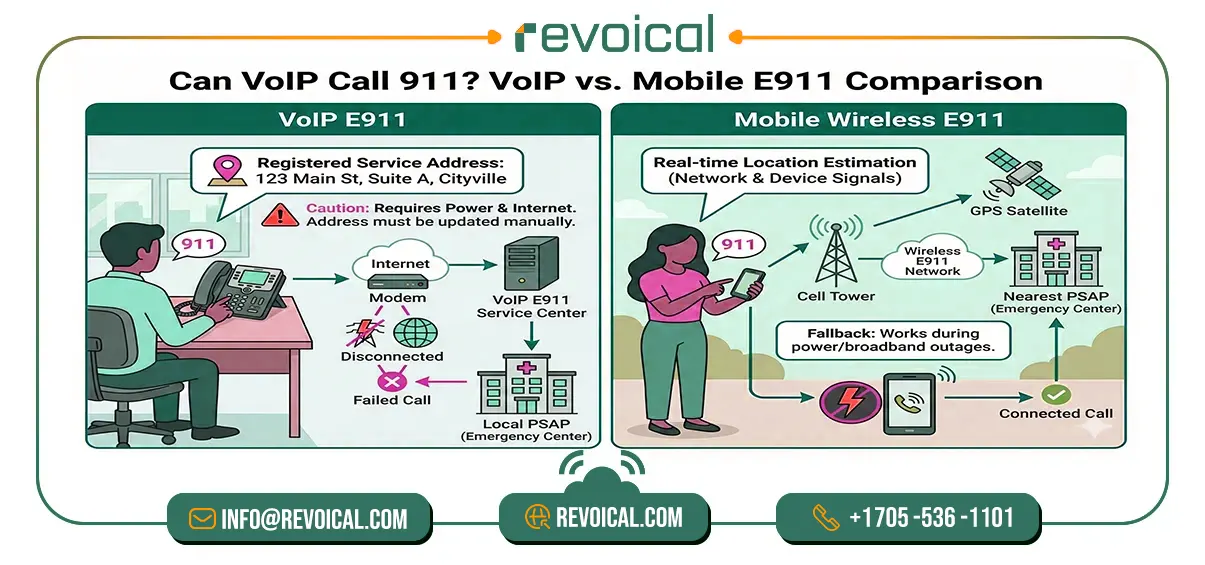
Yes—VoIP can call 911 through a service called E911. Instead of using cell-tower location like a mobile phone, E911 relies on the service address you register with your VoIP provider. That address tells the system which local emergency center should answer and where responders should go.
If the address is old or you’ve moved desks/offices without updating it, the call can still connect but may reach the wrong center or send responders to the wrong place.
In day-to-day use, VoIP 911 works much like a normal call: you dial, it connects, and a dispatcher picks up. The key difference shows up during power or Internet outages.
Because VoIP runs over your broadband and office equipment, a full outage can interrupt 911 calling—unless your setup keeps running with backup power (UPS) and an alternate data link (e.g., LTE failover). By contrast, mobile phones use Wireless E911, which draws on network and device signals to estimate location, so they often remain a fallback when building power or broadband goes down.
So voip can reach 911, but its accuracy depends on a current registered address, and its availability depends on power and connectivity. Keep the address up to date and make sure there’s a simple backup plan, so your team isn’t guessing in a real emergency.
Cost & Total Cost of Ownership (TCO): What you’ll actually pay
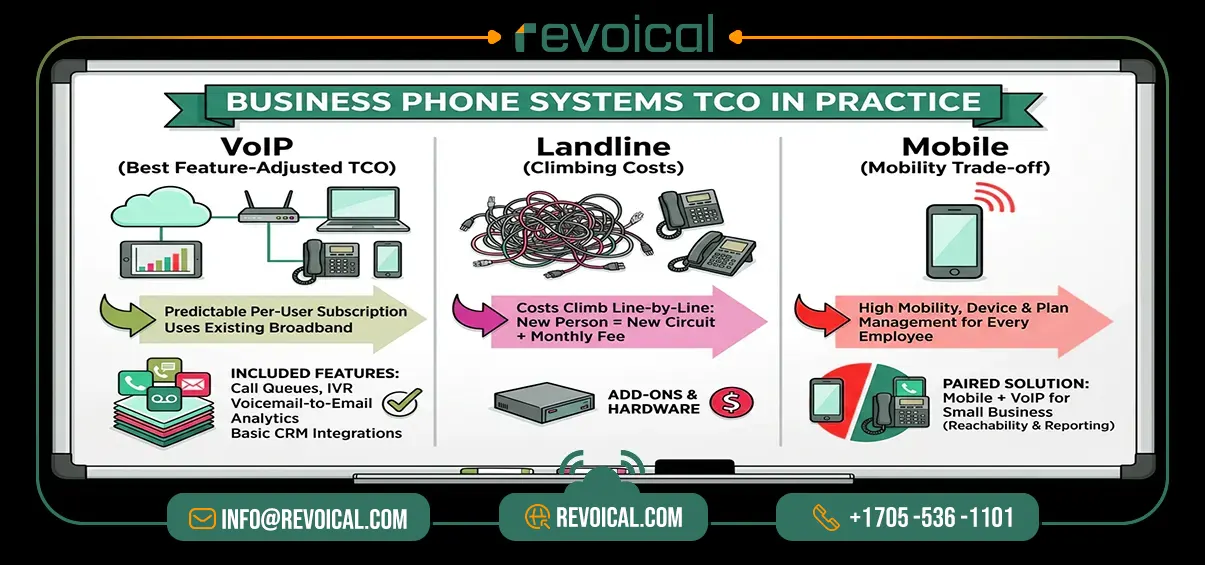
When teams compare VoIP vs landline vs mobile, the real question is simple: what will this cost us each month, and how will it scale? Here’s the plain-English view that small and mid-size companies use when budgeting a business phone system.
| System | What drives cost | Where it pays off |
| VoIP | Per-user license, optional IP phones (or softphones), Internet you already have | Lower long-distance, rich features included, easy multi-site scale |
| Landline (PSTN) | Per-line monthly fees, installation/maintenance | Simple for very small setups; predictable when Internet is weak |
| Mobile/Cellular | Device + plan per user, data add-ons | Best for field teams; keeps staff reachable on the move |
What this means in practice
For most companies—especially those searching for small business VoIP or a VoIP business phone service—VoIP usually delivers the best feature-adjusted TCO. You pay a predictable per-user subscription to your VoIP provider and run calls over the broadband you already have. Because features like call queues, IVR, voicemail-to-email, recording, analytics, and basic CRM integrations are built in, you don’t bolt on extra hardware or third-party tools as you grow.
Landline costs climb line-by-line: every new person, every new desk, another circuit and another monthly fee. It’s steady and familiar, but scaling across offices—or adding modern features—gets expensive fast.
Mobile shines for mobility. The trade-off is device and plan management for every employee. Many businesses pair mobiles with a VoIP for small business setup in the office (softphones or IP phones) to get both reachability and the reporting/features they need.
View plans & billing options for Hosted PBX
Features & Integrations: What You Really Get with VoIP
For businesses, the real difference isn’t just how calls travel—it’s the features you can use every day. Modern VoIP/UCaaS platforms typically include call queues, IVR, voicemail-to-email, call recording, analytics, and CRM/app integrations from day one.
That means faster setup, a consistent experience for office and remote users, and better data for sales and support. Landlines usually stay basic unless you add extra hardware. Mobile excels at mobility, but without a VoIP layer it lacks centralized call control, reporting, and queue management.
Is VoIP Secure? How to Keep Calls Safe
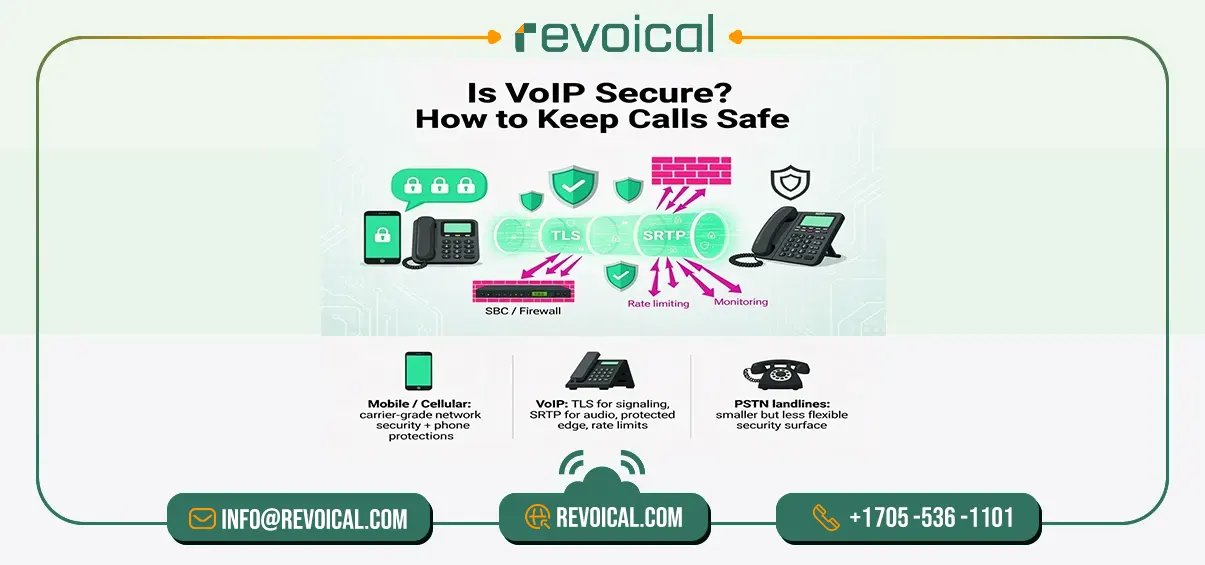
VoIP can be highly secure. you just need the right defaults. Modern services use TLS (to protect call setup) and SRTP (to encrypt the audio itself), so your VoIP calls aren’t readable on the network. A protected edge (think of an SBC or a well-configured firewall) blocks unwanted traffic, while rate limiting and monitoring help stop abuse and DDoS attempts before they affect users.
Mobile/cellular also benefits from carrier-grade protections plus the phone’s own security, and landlines (PSTN) have a smaller—but far less flexible—security surface
See how Revoical handles security, fraud prevention, and compliance
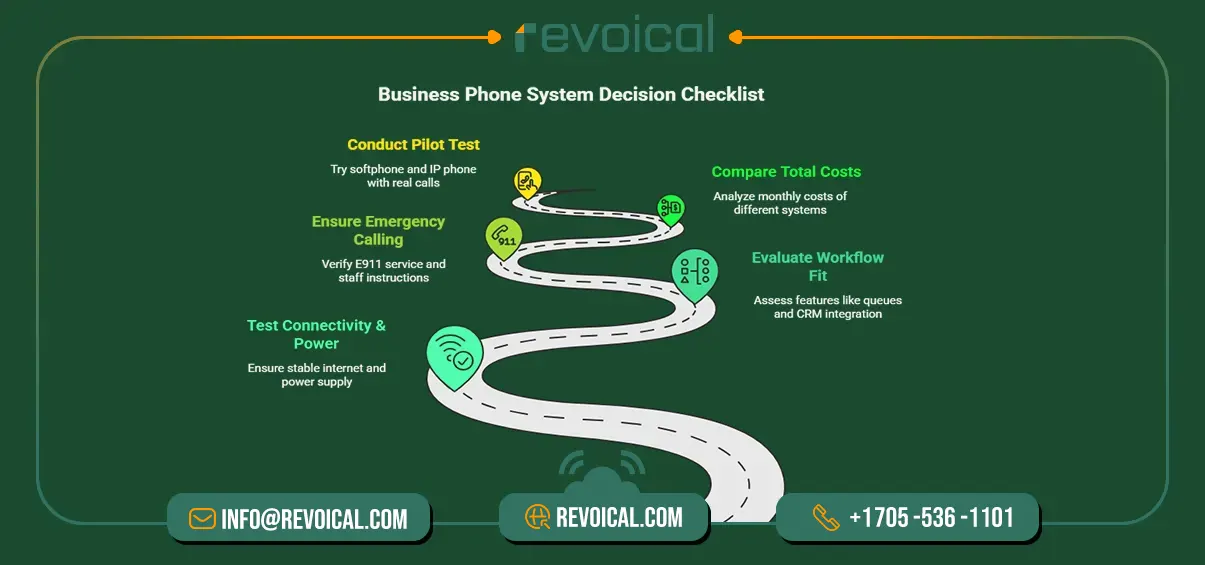
Choose Your Business Phone System in 5 Steps
Before you pick VoIP, landline, or mobile, use this simple checklist. It keeps the decision practical and focused on what your team actually needs.
- Connectivity & power
Make sure your Internet can handle calls smoothly. Check latency, jitter, and packet loss (your provider can help). Put the modem/router on a UPS and add a basic failover link (dual-WAN or LTE) so calls keep working during hiccups. - Workflow fit (features you’ll use)
Write down the features your team needs day-to-day: call queues, IVR, recording, voicemail-to-email, analytics, and CRM integrations. If software workflows matter, a VoIP phone system or Hosted PBX usually fits best. - Emergency calling
Confirm how E911 works with your setup. Keep your service address up to date, share simple instructions with staff, and run a quick test so everyone knows what happens if they dial 911. - TCO (total cost of ownership)
Compare monthly licenses/lines/devices with the value of built-in features and mobility. VoIP often wins on feature-adjusted cost; landline is predictable for very small sites; mobile adds reachability for field teams. - Pilot first
Run a short VoIP pilot. Try a softphone and an IP phone, place real calls, and watch quality. If everything feels solid, roll out in phases and keep the backup plan (mobile or a few landlines) in place.
This five-step check keeps your choice clear—use VoIP as the core when you want features and scale, keep mobile for on-the-go work, and add a small landline fallback only where uptime or local constraints demand it.
Conclusion
For most growing teams, the smart setup is simple: put VoIP at the core for modern features and lower, predictable costs; use mobile for true on-the-go coverage; and keep a few landlines only where power/Internet are unreliable. Start with a short VoIP pilot, confirm call-quality targets, and note your E911 steps—then scale with confidence.
If you want a fast, low-friction way to get there, Revoical Hosted PBX brings an AI-ready cloud phone system with 70+ enterprise-grade features—softphone and browser calling, queues, IVR, recording, analytics, and CRM integrations. So you can start quickly, grow cleanly, and keep calls reliable. Explore Features or Request a demo to see it in action.
FAQ
Plan ~100 kbps up & 100 kbps down per concurrent call. More important: low latency/jitter and near-zero packet loss.
Not by default. Keep the modem/router on a UPS and add LTE/dual-WAN failover. Many teams keep a couple of landlines or mobiles as backup.
Yes—via E911. Accuracy depends on your registered service address. Update it when you move desks/offices and test the procedure.
Softphones cut hardware costs and work anywhere; IP phones feel familiar and stay stable on Ethernet. Many companies deploy both.
Yes—enable TLS/SRTP, protect the edge (SBC/firewall), use strong credentials, and monitor for abuse/DDoS. It’s enterprise-grade when configured well.



No comment