

If you are asking what a call queue is, the simplest answer is this: a call queue is a feature in a business phone system that places incoming calls in a virtual waiting line when no agent is immediately available. Instead of missing the call or sending it away too early, the system keeps the caller in line until the next available team member can answer. That is why terms like call queues meaning, call queuing meaning, and what are queue calls are all closely related to the same idea.
A call queuing system is commonly used in customer service, sales, support, and reception teams to manage high call volumes more efficiently. It helps businesses organize incoming calls, reduce missed opportunities, and create a more consistent caller experience.
Depending on the platform, call queue software may include features such as call queue routing, call queue priority, call queue overflow, call queue callback, and call queue voicemail, all of which help control what happens when multiple callers are trying to reach your team at the same time.
In this article, we will explain the call queue definition in simple terms, show how a call queue works, and cover the main settings and features businesses should understand before choosing or configuring one. We will also look at common call queue options, basic call queue setup, and the key things to know about call queue configuration so you can decide whether this feature is right for your business.
Call Queue Meaning in Simple Terms

A call queue is a virtual waiting line for incoming phone calls. In simple terms, when all available team members are already busy, the next caller does not get lost right away. Instead, the call is placed in a queue and waits until a call queue agent becomes available. This is the basic call queue definition, and it is the reason many businesses use a call queuing system to manage incoming calls more efficiently.
When people search for call queues meaning, call queuing meaning, or ask what are queue calls, they are usually trying to understand this exact process. Queue calls are simply calls that are waiting in line to be answered. Rather than sending every caller to voicemail immediately, call queue software helps organize demand and gives each call a better chance of reaching the right person.
A call queue is especially useful for support teams, sales departments, and customer service desks that receive multiple calls at the same time. Instead of creating confusion, the system keeps callers in order and applies the chosen call queue options and call queue settings behind the scenes. For example, a business may decide how long a caller should wait, which agent should answer first, and what should happen if the wait becomes too long.
In other words, a call queue helps businesses handle busy periods in a more structured way. It is not the same as a simple call waiting queue on a personal phone. A business call queue is part of a broader call queue setup and call queue configuration, designed to route incoming calls in a professional and predictable way.
Related Post: Top Features in a Modern Cloud-Hosted PBX
The Main Parts of a Call Queue System
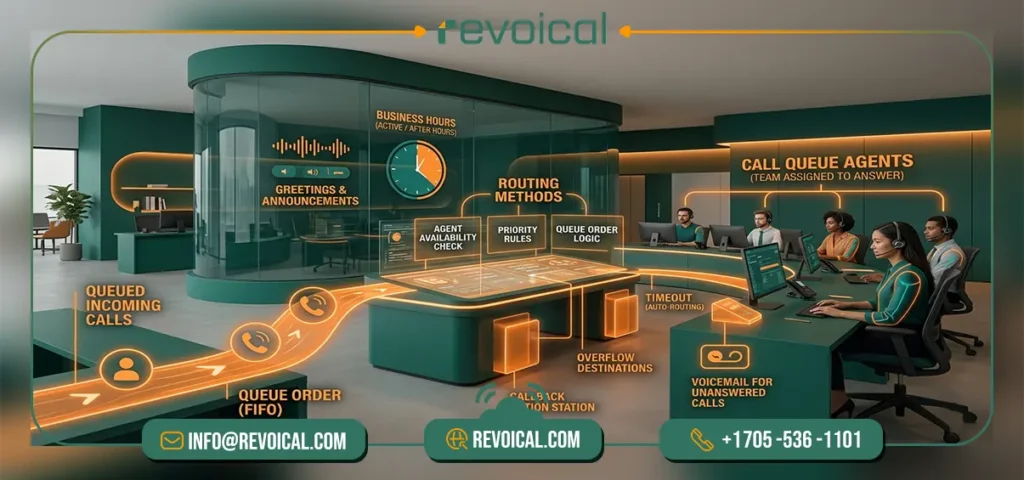
A business call queuing system is made up of a few core elements that control how incoming calls are handled from start to finish. The most important part is the call queue agent, which is the person or group assigned to answer queued calls. Around that, the system uses call queue routing and different call queue routing methods to decide who should receive the next call. This may include rules such as call queue priority, agent availability, or queue order.
Other key parts of a good call queue configuration include call queue settings for queue timeout, call queue overflow destinations, call queue callback options, and call queue voicemail for unanswered calls.
Most call queue software also includes greetings, announcements, and business hours, so calls can be handled differently during and after office hours. Together, these call queue options shape the full call queue setup and help businesses manage caller experience, response flow, and overall call queue status more effectively.
See Revoical Hosted PBX Featurs
How a Call Queue Works Step by Step
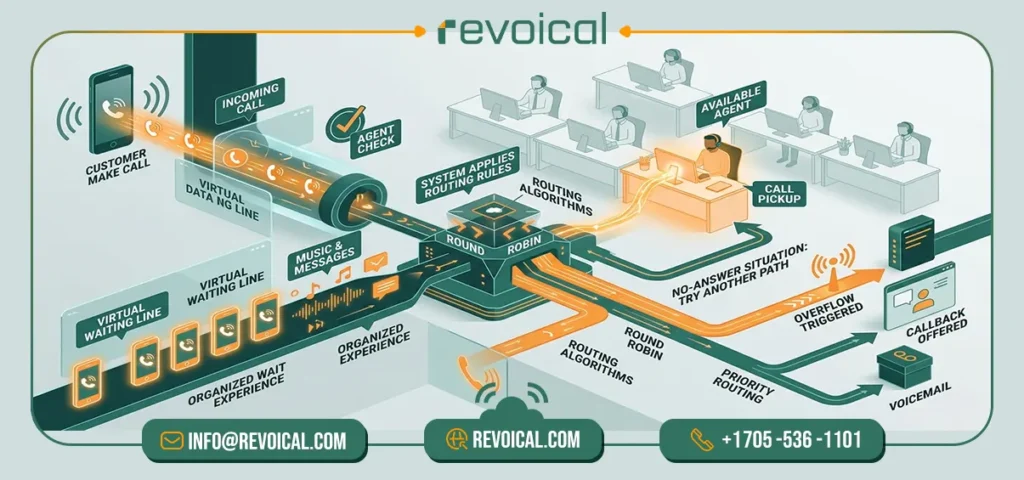
- The call enters the system
When a customer calls your business, the phone system receives the call and checks whether an agent is available. If no one can answer right away, the call moves into the queue. - The caller waits in line
While the caller is waiting, the system may play hold music, announcements, or other messages based on your call queue settings. This helps create a more organized experience instead of leaving the caller in silence. - The system applies routing rules
Next, the platform uses call queue routing and selected call queue routing methods to decide who should receive the call. This may include call queue round robin, priority-based routing, or other queue rules. - An available agent receives the call
As soon as a call queue agent becomes available, the system sends the call to that person for call queue pickup. At this stage, the goal is to connect the caller to the right team member as quickly as possible. - The system checks for no-answer situations
If the first agent does not answer, the call does not have to end there. Depending on the call queue configuration, the system can try another agent or follow a different call path. - Overflow, callback, or voicemail is triggered
If the wait becomes too long or no agent is available, call queue overflow rules may redirect the call. The caller may be offered a call queue callback or sent to call queue voicemail, depending on the business’s call queue options.
What Happens When a Call Enters a Queue?
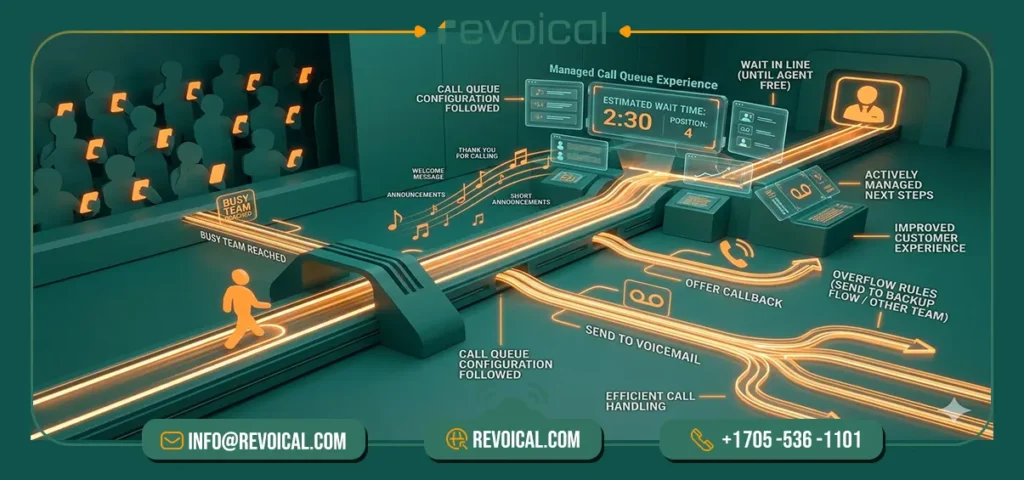
When a caller reaches a busy team, the system places that caller on queue and manages the experience based on the company’s call queue settings and call queue options. In most cases, the caller hears hold music, a welcome message, or short announcements that explain they are waiting in line.
Some systems also share basic call queue status details, such as an estimated wait time or position in the queue, to make the experience clearer and less frustrating. This is one of the main reasons a modern call queuing system feels more organized than a simple call waiting queue.
From there, the platform follows the business’s call queue configuration. The call may stay in line until a call queue agent is free, offer a call queue callback so the customer does not need to keep waiting, or move to call queue voicemail if no one answers in time.
In higher-volume environments, call queue overflow rules may also send the call to another team, destination, or backup flow. In short, the caller does not just wait silently; the system actively manages the next step to improve both customer experience and call handling.
Related Featurs of Hosted PBX: Time & Intelligent Routing
Call Queue vs Call Waiting: What’s the Difference?

Although these terms are often confused, a call queue and call waiting are not the same thing. A call queue is designed for business phone systems and team-based call handling. It places incoming callers in a virtual line and manages them using call queue routing, call queue priority, and other call queue options until a call queue agent is ready to answer.
This is why a call queuing system is commonly used in support, sales, and service teams that need to handle multiple calls at once in a structured way.
Call waiting, by contrast, is usually a basic phone feature for a single user or line. It simply alerts one person that another call is coming in while they are already on a call. It does not offer the broader call queue configuration found in business systems, such as call queue overflow, call queue callback, or call queue voicemail.
In short, call waiting helps one user manage a second incoming call, while a call queue helps a business manage many incoming calls across a team. This is also why a call waiting queue should not be understood as the same thing as a full business call queue.
Related post: VoIP vs Landline vs Mobile
Who Should Use a Call Queue?

A call queue is useful for any business that receives more calls than one person can answer at once. Small businesses often use a call queuing system to avoid missed calls during busy hours, while sales teams use call queue software to distribute inbound leads more fairly and connect callers to the next available call queue agent.
Support teams and contact centers benefit from more advanced call queue routing, call queue priority, and call queue overflow rules, which help them manage high call volumes without creating a poor customer experience.
The same applies to clinics, repair companies, field service teams, and other service-based businesses that need a more organized call queue setup. For example, a clinic may use queue rules to direct patients to reception first, while a service company may offer call queue callback or call queue voicemail when all agents are busy.
In short, if your team regularly handles incoming calls, needs clearer call queue options, or wants a more structured call queue configuration, a call queue can make call handling much more efficient.
How to Set Up a Call Queue
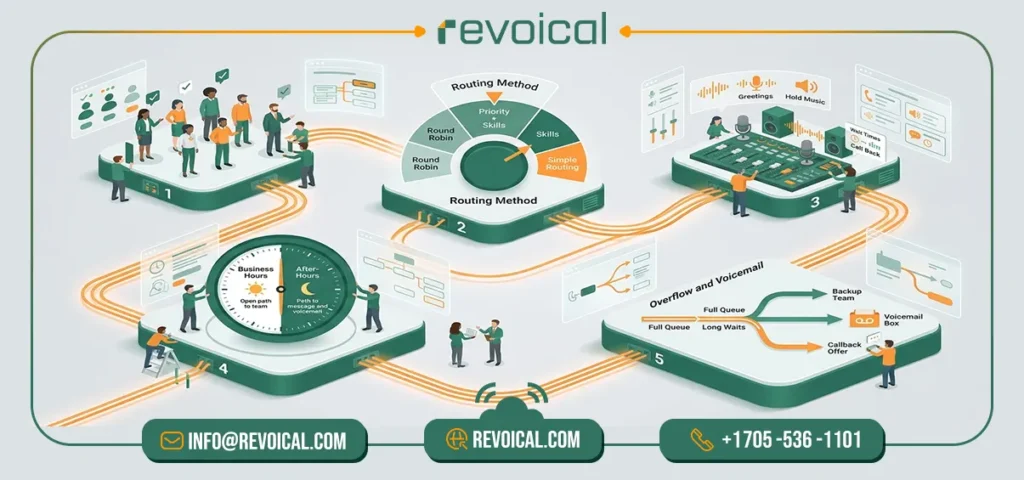
A good call queue setup starts with a few practical decisions. You need to choose who will answer calls, how calls should be routed, what callers will hear while they wait, and what should happen if no one is available. In most cases, the best approach is to keep the call queue configuration simple at first and then refine the call queue settings as your team grows.
The goal is not just to turn on a feature, but to build a call queuing system that matches how your business actually handles incoming calls.
The exact call queue options may vary by platform, but the setup process is usually similar across most business phone systems. Whether you are using general call queue software, call queue on Teams, call queue Twilio, call queues RingCentral, or even a platform like call queue Grandstream UCM, the same core setup steps apply.
1. Choose Your Agents
The first step is to decide which users should be part of the queue. These are your call queue agent members, meaning the people responsible for answering incoming calls. In a small team, this may be everyone in sales or support. In a larger business, you may want only trained staff or specific call queue authorized users to receive calls from that queue.
It is also important to think about availability. Some teams want all agents included all the time, while others only want active users to take calls. This is where features like call queue presence based routing can help, because the system can check whether an agent is available before offering the call.
2. Select a Routing Method
Once your agents are assigned, the next step is choosing how calls should be distributed. Different call queue routing methods work better for different teams. For example, call queue round robin is often a good fit when you want calls shared evenly across the group, while call queue priority rules may work better when certain agents or callers should be handled first.
More advanced call queue routing can also depend on agent status, skills, or queue order. The right option depends on your team structure, response goals, and caller expectations. A simple routing method is usually best in the beginning, especially if you want a clean and manageable call queue setup.
3. Add Greetings and Hold Music
Callers should know they have reached the right place and understand what is happening while they wait. That is why greetings, announcements, and hold music are a standard part of professional call queue settings. A short welcome message can confirm the caller is in the right queue, while hold music helps make the waiting experience feel more polished.
This part of the call queue configuration also gives you a chance to share useful information. For example, you can explain expected wait times, offer self-service instructions, or let callers know they may have the option for a call queue callback if the wait becomes too long.
4. Set Business Hours and After-Hours Rules
Your queue should not behave the same way at every hour of the day. During business hours, calls may ring directly to your team, but after hours, weekends, or holidays, you may want a different flow. That is why business hours are a key part of call queue setup and should be included in your overall call queue options.
For example, after-hours calls may go to a recorded message, another department, or call queue voicemail. Setting these rules early helps maintain a consistent caller experience and ensures your call queue software continues to work properly even when your main team is offline.
5. Configure Overflow and Voicemail
No queue should leave callers waiting forever. A strong call queue configuration includes clear rules for what happens when the queue is full, the wait is too long, or agents do not answer. This is where call queue overflow becomes important. You can send calls to another queue, another number, a backup team, or a voicemail destination depending on your business needs.
You should also decide when call queue voicemail should be offered and whether callers should be given a call queue callback option instead of staying on hold. These settings make the queue more flexible and help reduce missed opportunities, especially during busy periods or when staffing is limited.
Related Featur Of Revoical Hosted PBX: Call Center & Contact Center
Conclusion
In short, call queuing helps businesses manage inbound calls more efficiently by reducing dropped calls, improving the response flow, and creating a better customer experience during busy periods. When set up properly, features like call routing, call overflow management, call answering, and voicemail can make a big difference in how your team’s communications run smoothly.
If your business is looking for a more reliable and professional VoIP solution, Revoical offers VoIP services and business communications solutions designed to support smarter call management and scalable voice operations. Get in touch with Revoical to discuss the right solution for your team and improve the way you handle every inbound call.
FAQ
When a user is set to accept queue calls, it means they are allowed to receive calls from an assigned queue. In simple terms, the system can send queued callers to that user when routing rules match and the person is available to answer.
In many call queue on Teams setups, a call queue resource account is used to connect the queue to a phone number or service entry point. This helps the queue function as a shared business destination instead of relying on one personal user account.
Yes, some platforms support queue management through command-line tools such as call queue PowerShell or Teams call queue PowerShell. This is usually helpful for administrators who want to update settings, users, or policies more quickly across multiple queues.
Yes. Many modern platforms include call queue report features, call queue usage report tools, and even integrations such as call queue Power BI report options for deeper analysis. These reports can help businesses review call volume, response patterns, and overall queue performance over time.
Yes, depending on the provider, businesses may configure queues differently for call queue toll vs toll free scenarios. The queue logic may stay the same, but number type, caller expectations, and cost structure can affect how businesses design their inbound call flow.


No comment